PC Remote Control Pro2.0
Publisher Description
PC Remote Control Pro is pro version of PC Remote Control. It is a remote desktop application. It help you to control computers and laptops over Wi-FI and Bluetooth on mobile devices. PC remote Controller supports windows, Linux and Mac.
Control your PC on mobiles by mouse and keyboards from anywhere in wireless and Bluetooth range.
PC Remote Control main functions;
Mouse Remote
Keyboard Remote
Real time PC screen on mobile (only in paid version)
File Explorer for managing files
Media Controls including VLC etc
PowerPoint Presentations
Secure connection protected by password
Shortcuts Control for fast working (only in paid version)
Browser Remote including chrome, Firefox etc. (only in paid version)
Mouse Remote
Will be a wonderful feeling control the window touchpad on mobile device? Even users can zoom and scroll the pc screen on mobile device.
Keyboard Remote
Type on your mobile device through android keyboard or any other keyboard and they will appear on PC. Saves lot of time and ease of typing.
PC Screen Sharing
Users can see PC screens on their android devices so they can easily use mouse and keyboard remote for effective working. Users can also take screen shots of PC screens.
File Explorer
Delete, move and replace files in PC hard disk to manage spaces of drives using PC Remote Control surely you will love it.
Media Controls
Control any media player including Window Media Player, iTunes, VLC etc on PC through mobile device.
PowerPoint Presentations
Create and manage PowerPoint presentations on PCs. This is very helpful especially during slides presentation. Users can simply change slides on their mobiles without going to their PC’s.
Secure connection
Connection between computer and mobile devices are secured by passwords. So, no one can connect to PC automatically and hack some important stuff.
Shortcuts Control
Shortcuts are there for quickly editing documents, fast browsing and searching files in PC. Save lot of time of users.
Browser Remote
Control chrome, Firefox, Internet Explorer and others through PC Remote controller on PC’s.
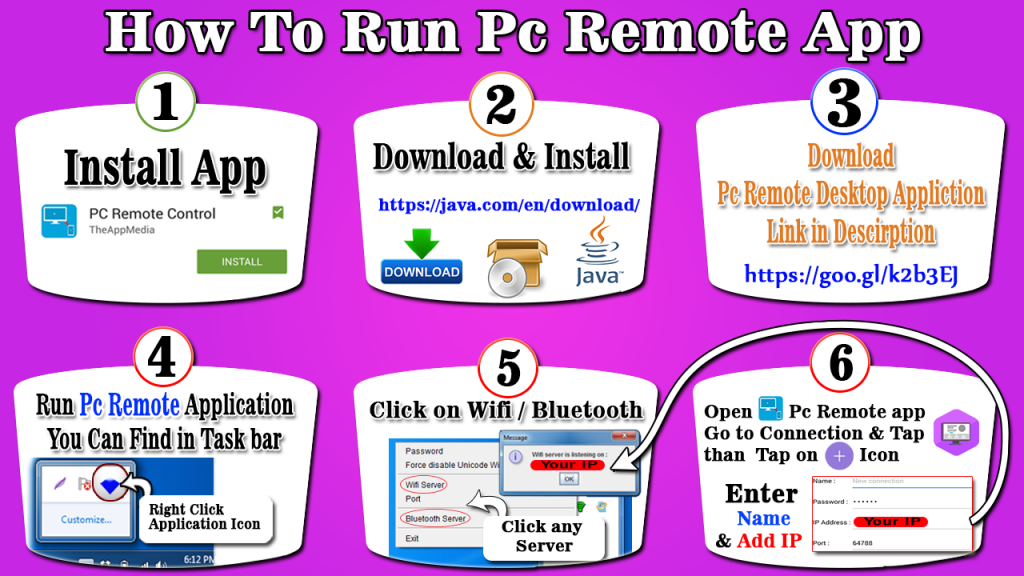
Setup Guide:
- Install app on device.
- Download and install PC Remote Server on your computer from https://goo.gl/k2b3EJ or http://theappmedia.com/pc-remote-control
- Install it on PC
- Open the Server
- Open app and press on connections
- Create a new connection (Wi-Fi or Bluetooth)
- Setup a name of connection
- Enter a password which is set by default “Remote”. If you want to change it you can change it through server properties in PC.
- Depends on type of connection. If Wi-Fi enters IP address in IP field you can get the same from properties of server or even clicking on server in taskbar. Same for Bluetooth but for that enter Bluetooth address instead of IP.
- Save your connection
- Long press connection and select Use
- All set!! Now explore and use any feature of PC Remote Control
Surely PC Remote Control is very productive application for users. Enjoy the application!
Troubleshoot
Connection Disabled or Server Not Found
Recheck the IP address in connection portion and if not found please enter the IP address
Check for is server running on PC? If not please start the server
Verify and if required change from network sharing center Public network to Home network
Media, shortcut Browser or any other feature not working properly
Open the server App and Remove the Tick from Force disable Unicode windows
Google Plus https://plus.google.com/b/102527705279415190891/
Facebook https://www.facebook.com/PCRemoteControl
If you face any issue simple contact us itsehsan.mahmood@gmail.com
About PC Remote Control Pro
The company that develops PC Remote Control Pro is MayaLogic Inc.. The latest version released by its developer is 2.0.
To install PC Remote Control Pro on your Android device, just click the green Continue To App button above to start the installation process. The app is listed on our website since 2015-05-15 and was downloaded 46 times. We have already checked if the download link is safe, however for your own protection we recommend that you scan the downloaded app with your antivirus. Your antivirus may detect the PC Remote Control Pro as malware as malware if the download link to com.theappmedia.pcremotecontrol.plus is broken.
How to install PC Remote Control Pro on your Android device:
- Click on the Continue To App button on our website. This will redirect you to Google Play.
- Once the PC Remote Control Pro is shown in the Google Play listing of your Android device, you can start its download and installation. Tap on the Install button located below the search bar and to the right of the app icon.
- A pop-up window with the permissions required by PC Remote Control Pro will be shown. Click on Accept to continue the process.
- PC Remote Control Pro will be downloaded onto your device, displaying a progress. Once the download completes, the installation will start and you'll get a notification after the installation is finished.
Program Details
System requirements
Download information
Pricing
Version History
version 2.0-plus
posted on 2015-05-15
Issue Resolved.
